For QCTO-accredited skills development providers
Every learner, PoE and record in one place
QCTO Boss keeps your learners, attendance, assessments and portfolios of evidence (PoEs) together, from enrolment to the QCTO’s certificate. It checks your learner data before you send it to the QCTO, and puts a QR code anyone can scan on every statement of results and short-course certificate you issue.
QCTO Boss is in development. Get early access and help shape it.
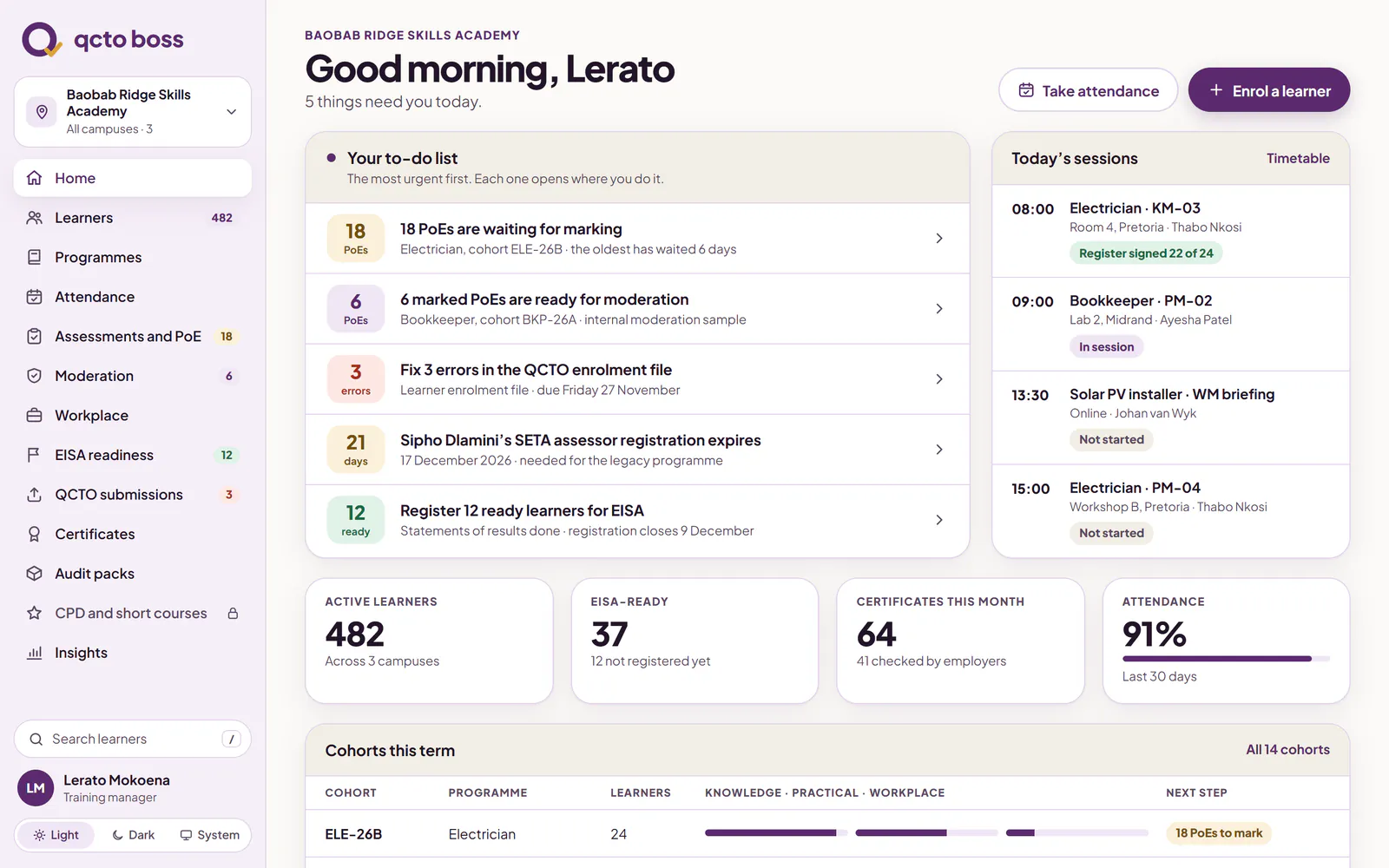
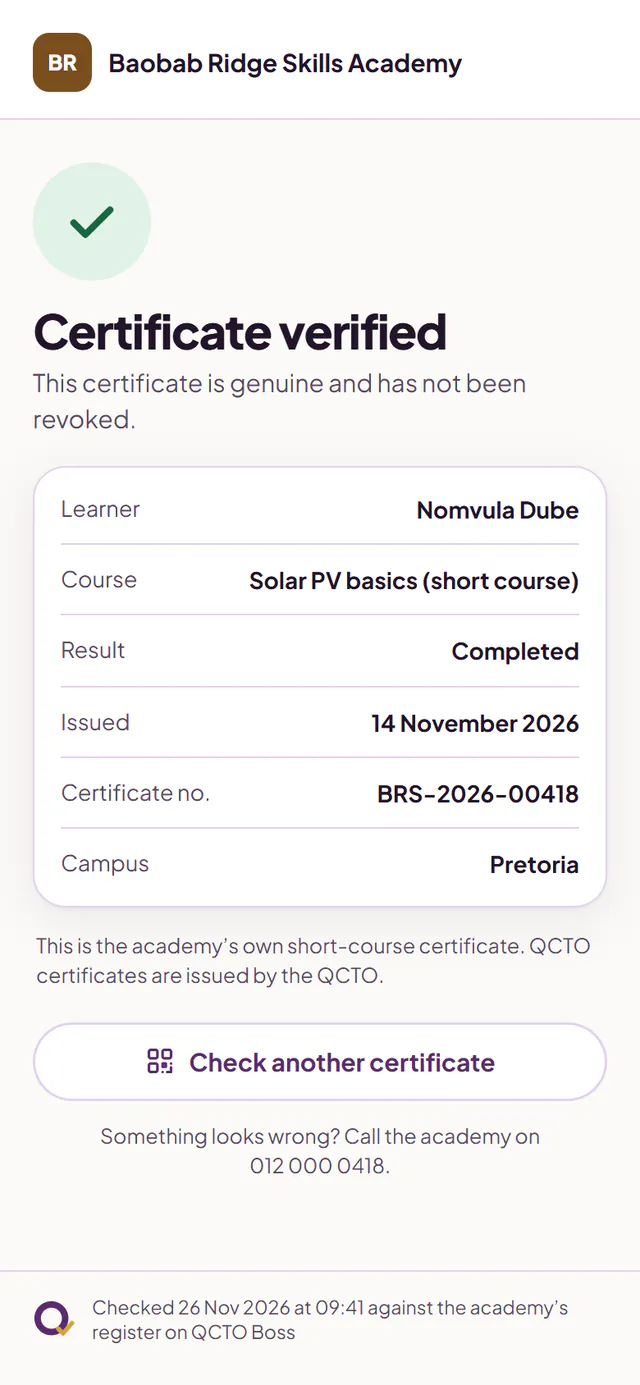
Design preview with made-up learners.
Accreditation lives or dies on your records
When the QCTO asks for learner data or comes for a monitoring visit, you need every record ready to show. Most providers keep them in spreadsheets, shared drives and paper files, and lose days rebuilding them every time.
Learner details
ID or passport, demographics, contact details and enrolments, in the form the QCTO’s enrolment file asks for.
Attendance
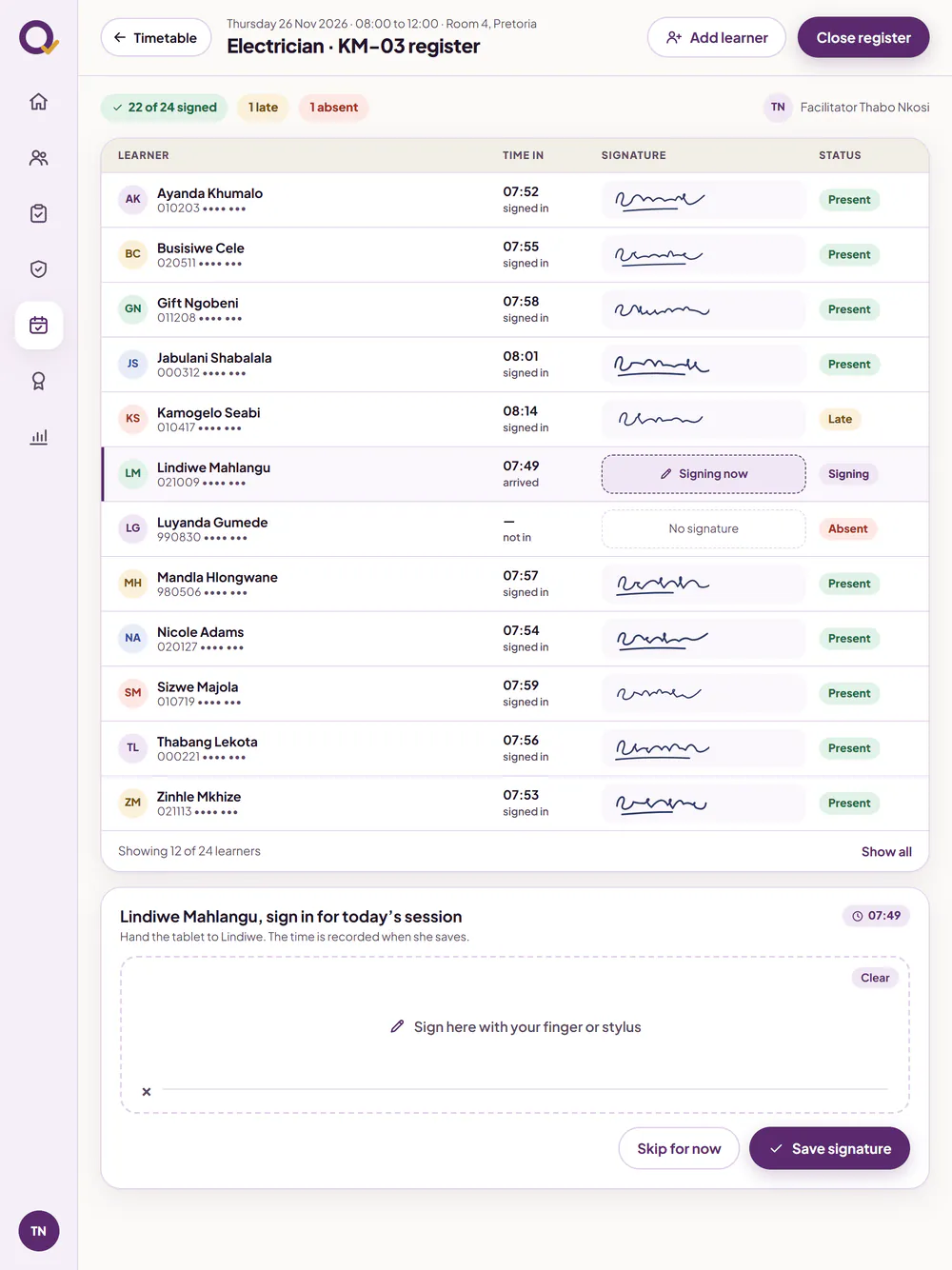
A signed register for every session, and each learner’s attendance over the programme.
PoEs and sign-offs
The evidence, the assessor’s marks, the moderator’s findings and every signature.
EISA readiness
Who has finished every module and their workplace experience, ready for the external integrated summative assessment (EISA).
From enrolment to certificate, with an audit trail
Design preview with made-up learners. Every screen works on a computer, a tablet and a phone. See every module.
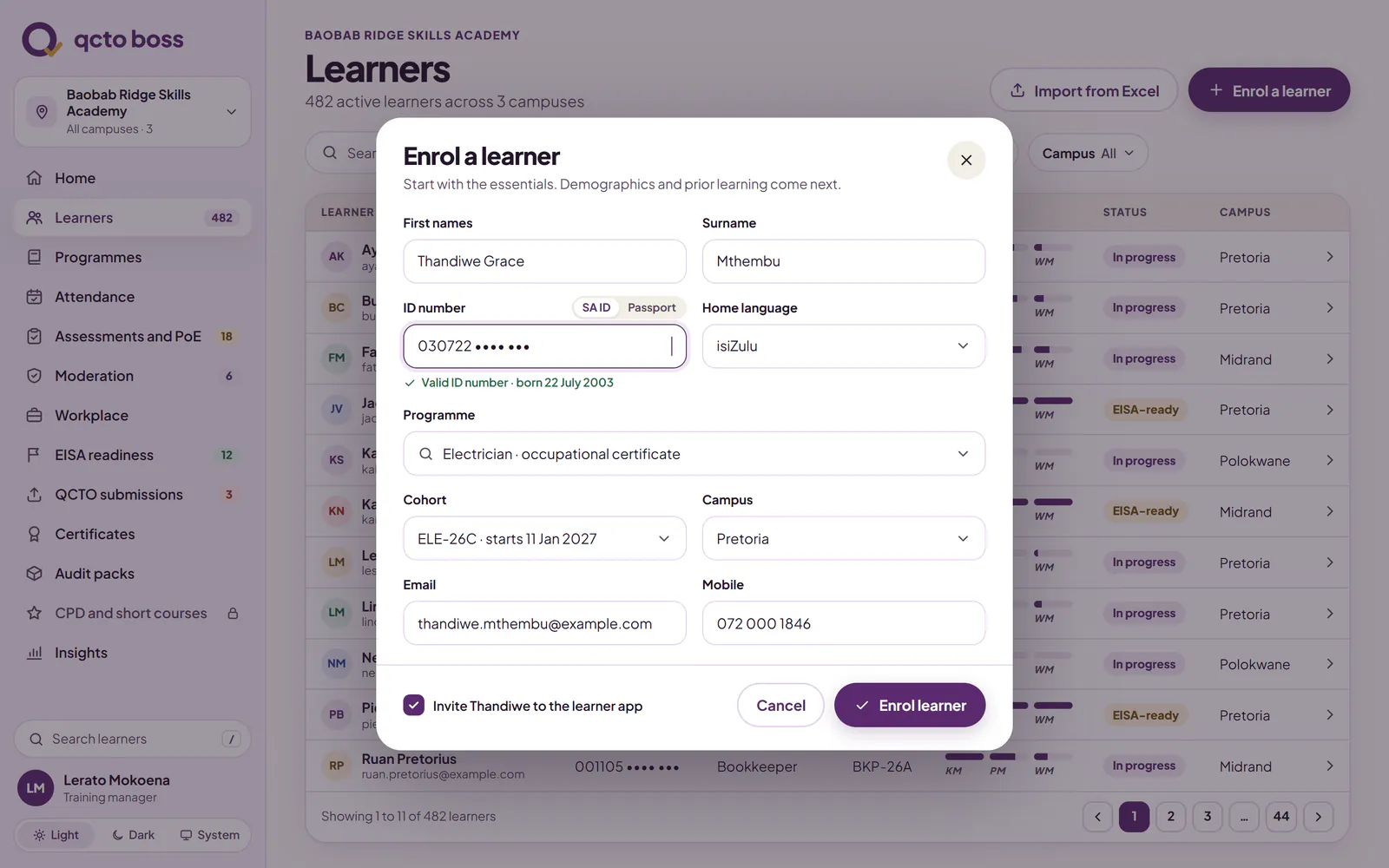
Every learner’s record in one place
Each learner’s details in the form the QCTO’s enrolment file asks for, their enrolments, cohort and campus, and their whole history in one view. Bring your existing lists in from Excel.
- ID numbers checked, and stored encrypted
- Knowledge, practical and workplace progress at a glance
- Search and filter by programme, cohort, campus or status
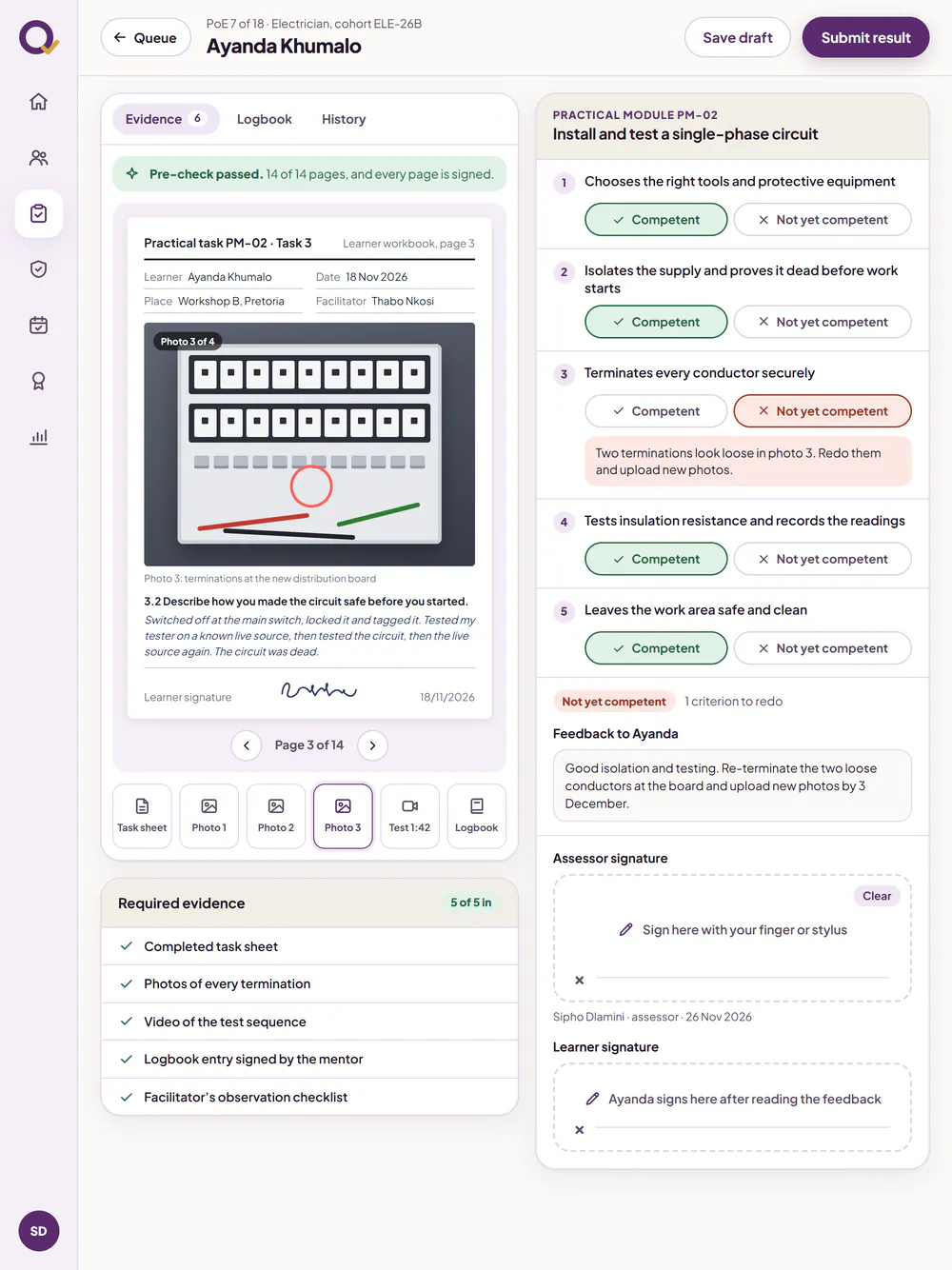
Mark portfolios of evidence on a tablet
The learner’s evidence on one side and the assessment criteria on the other. Mark each criterion competent or not yet competent, give feedback, and sign on the screen.
- Photos, documents and video together
- Resubmissions tracked against the first attempt
- A pre-check flags missing pages before you start
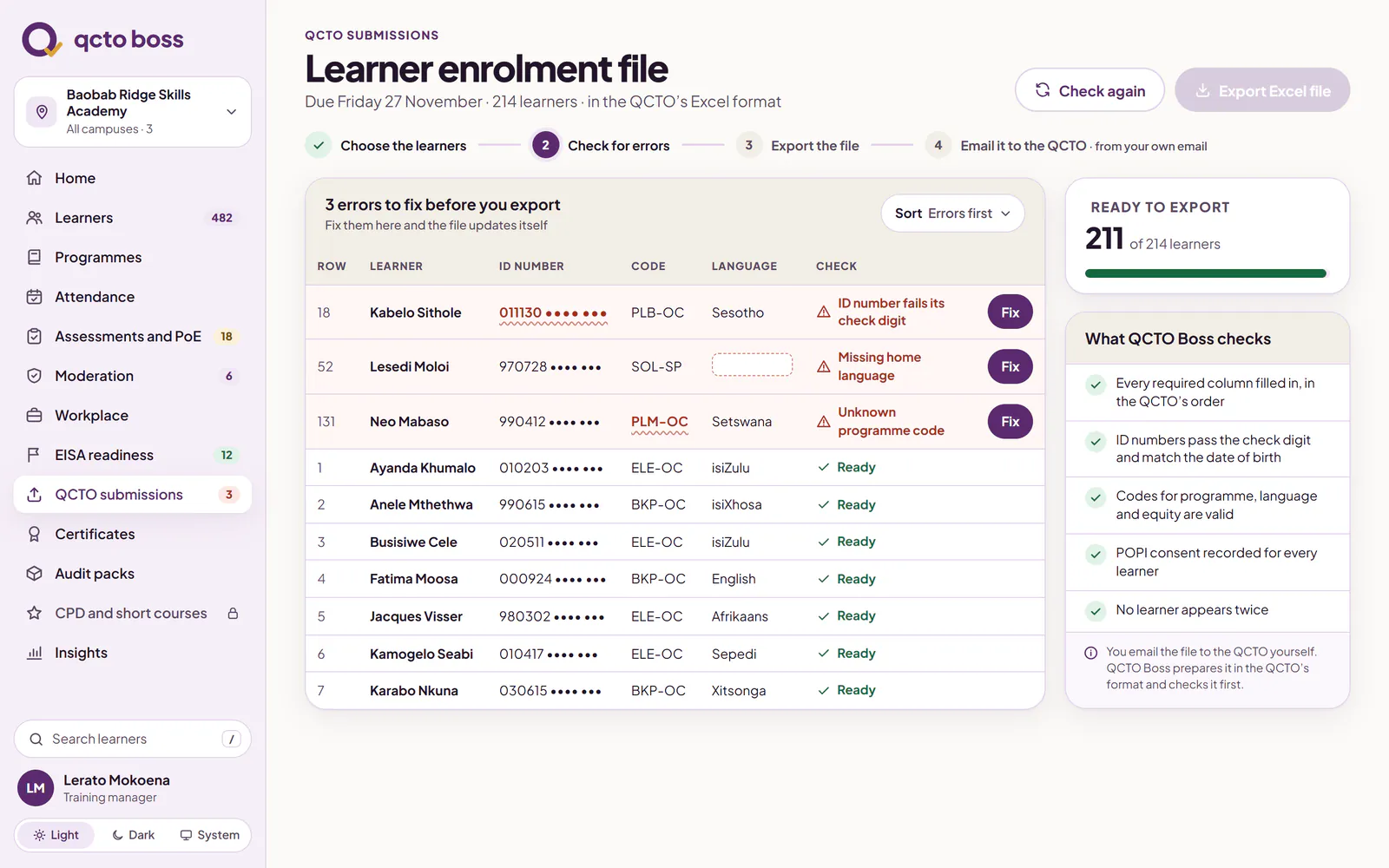
Find data errors before you send the file
QCTO Boss prepares your learner enrolment and EISA readiness files in the QCTO’s Excel format and checks them first: ID numbers that fail their check, missing fields and invalid codes, each with a Fix button. Then you email the file to the QCTO as usual.
- Errors listed by learner, in plain words
- Fixed in the learner’s record, not in a spreadsheet
- Exported in the QCTO’s column order, as text
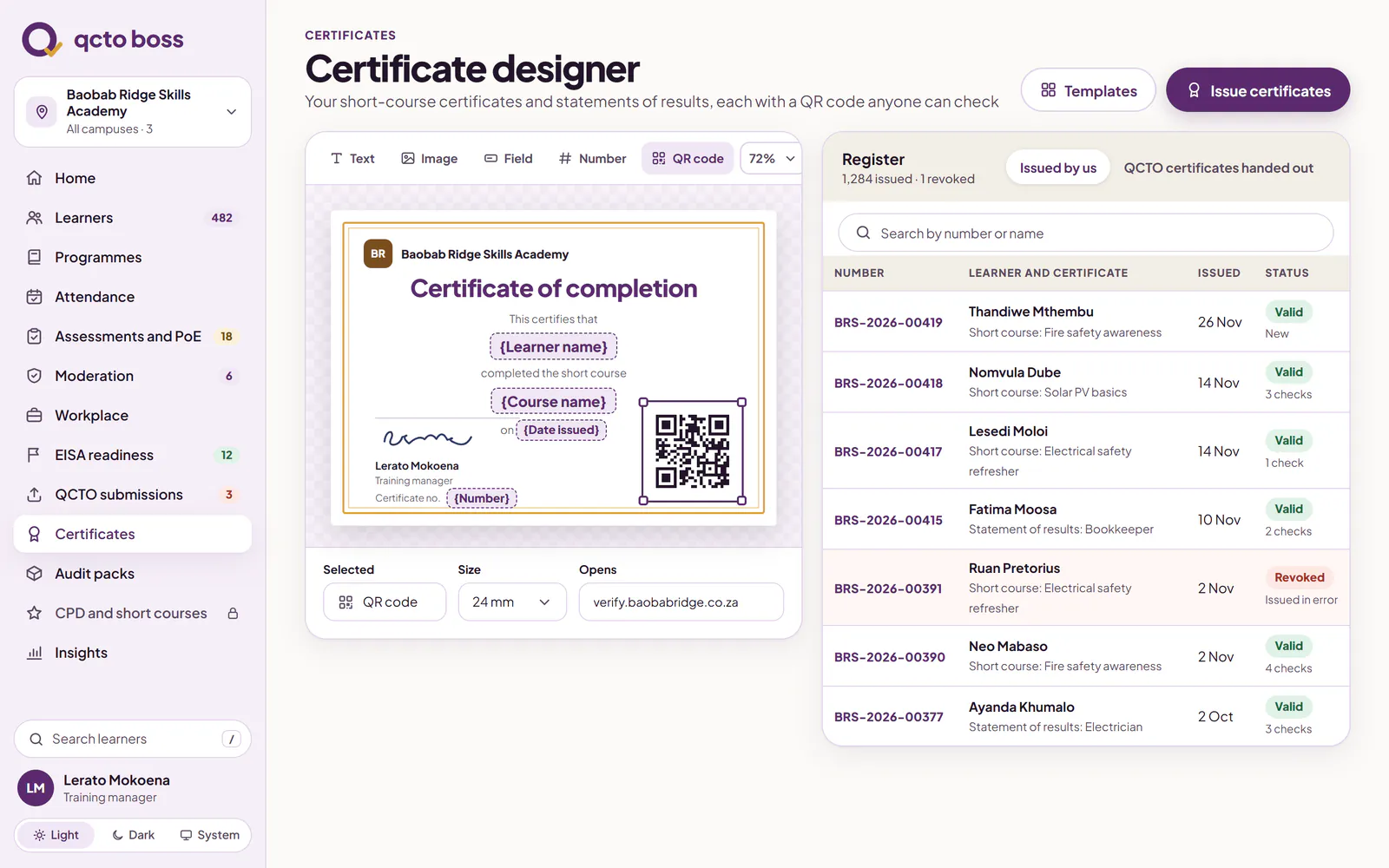
Documents anyone can verify
Issue your statements of results, and certificates for your short courses and CPD activities, from your own templates. Each one gets a unique number and a QR code that opens a verification page on your own web address.
- Employers see “genuine” or “not found” in seconds
- Revoke a document and its page says so
- A register of everything you issue, and of the QCTO certificates you hand out
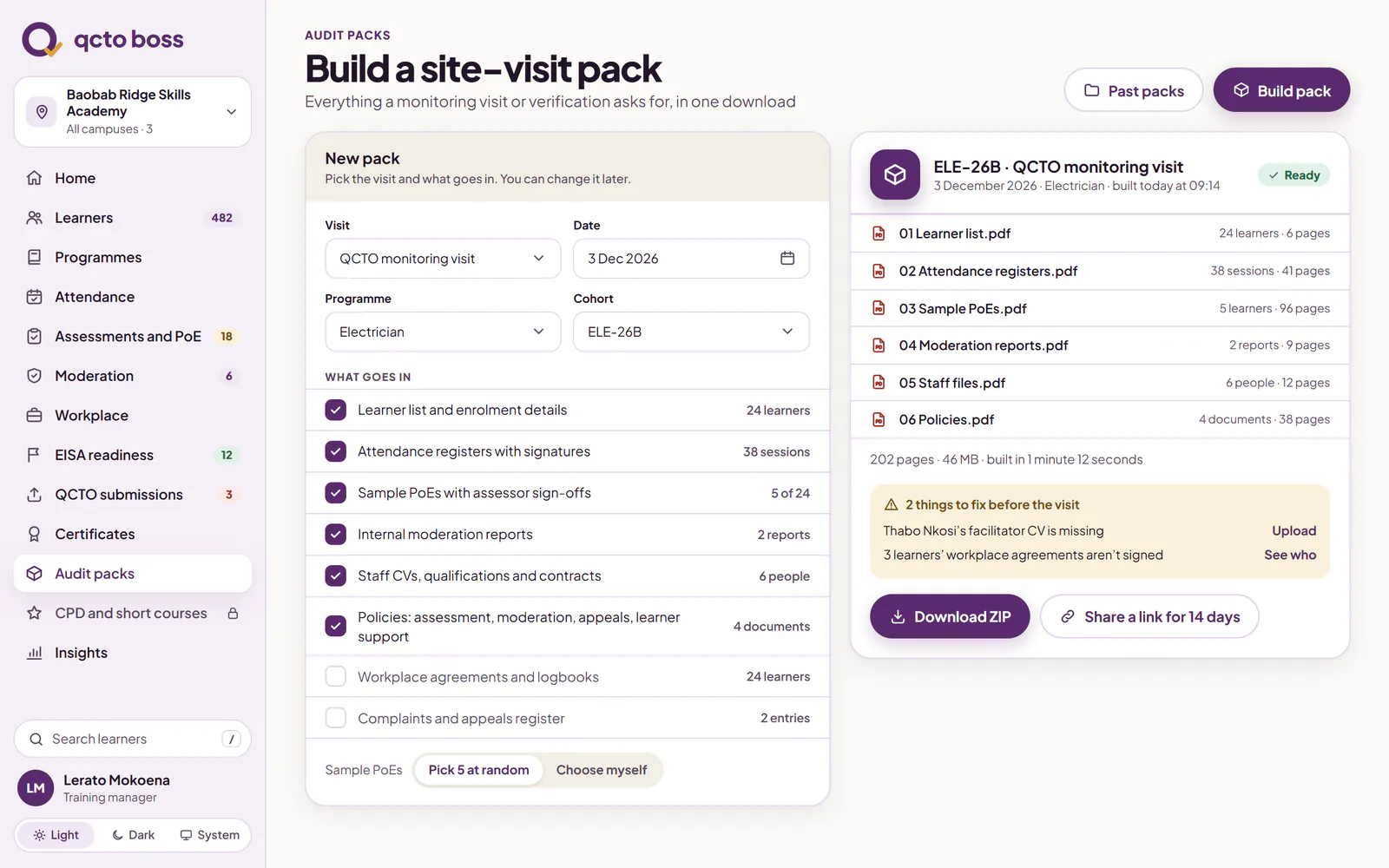
An audit pack in minutes, not days
Choose a cohort and what to include. QCTO Boss builds the pack for a QCTO monitoring visit or a SETA verification: learner lists, attendance, sample PoEs with sign-offs, moderation reports, staff files and policies.
- Everything indexed in one download
- Sample PoEs picked for you, or by hand
- Gaps listed before the visitor finds them
Fake certificates stop working
Every statement of results and short-course certificate you issue carries a unique number and a QR code. An employer scans it with a phone camera and sees your learner’s name, the course or programme and the date, marked genuine. If it isn’t one of yours, the page says it wasn’t found.
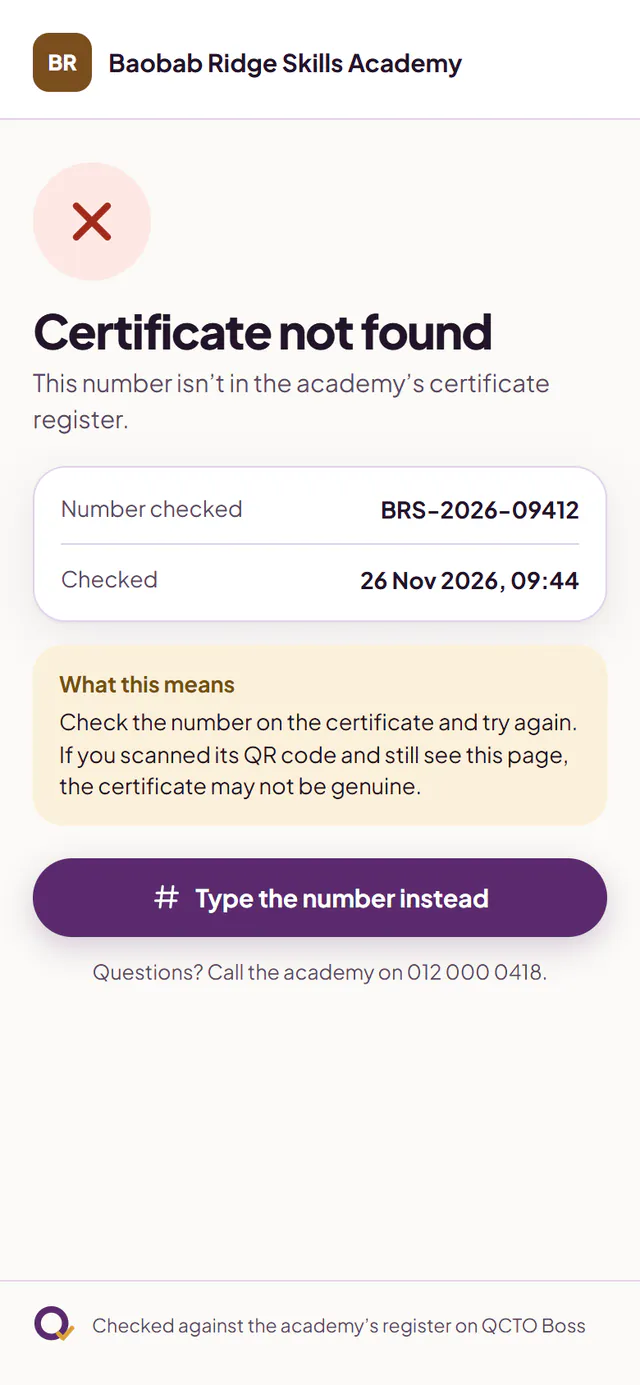
- You issue the document
From your own template, numbered and with its QR code in place. - An employer scans it
No app needed. Any phone camera opens the page. - They see it’s genuine
On your own web address, with your name on it.
QCTO Boss issues your provider’s own documents. Occupational, part qualification and skills programme certificates come from the QCTO.
On your computer, tablet and phone
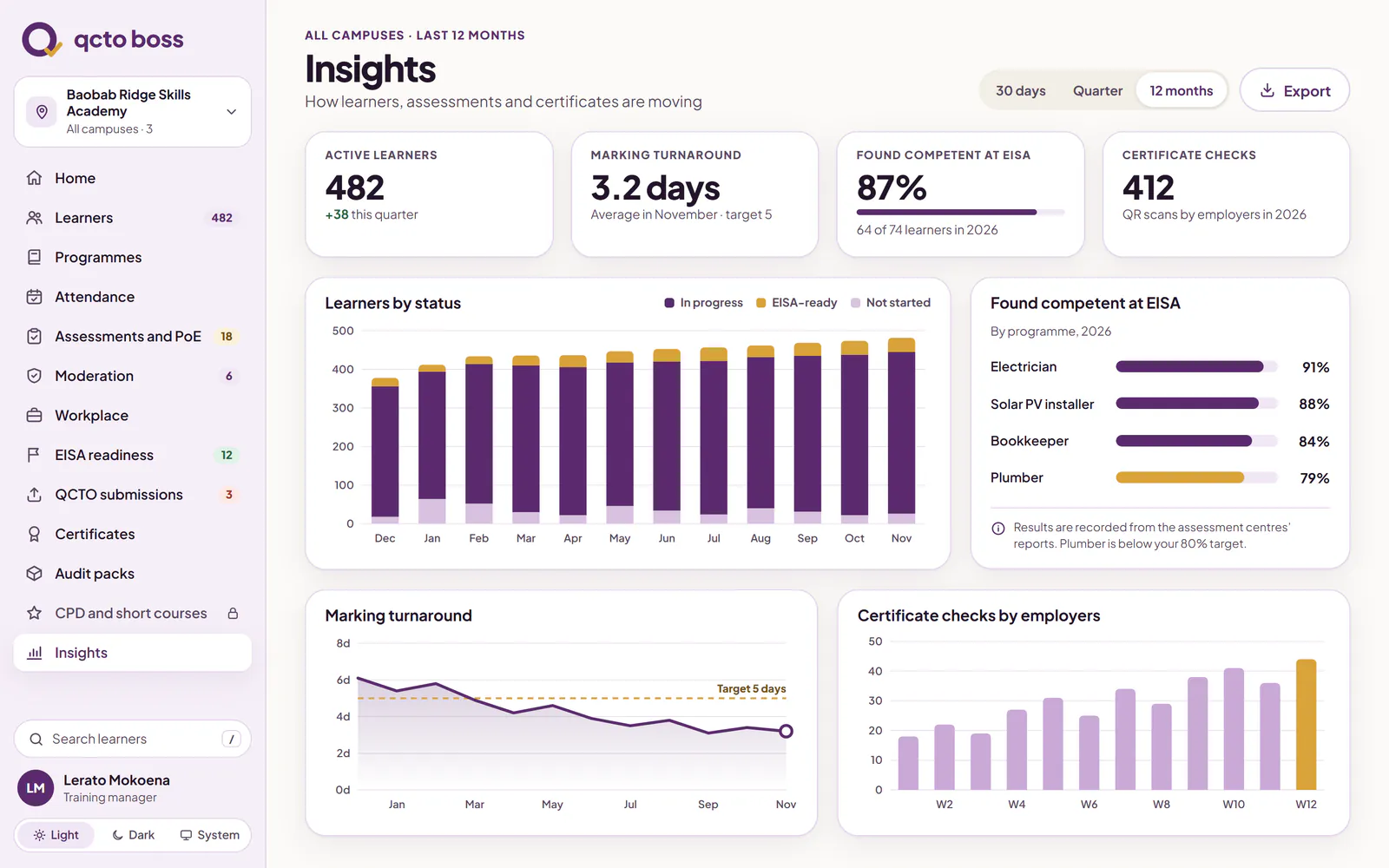
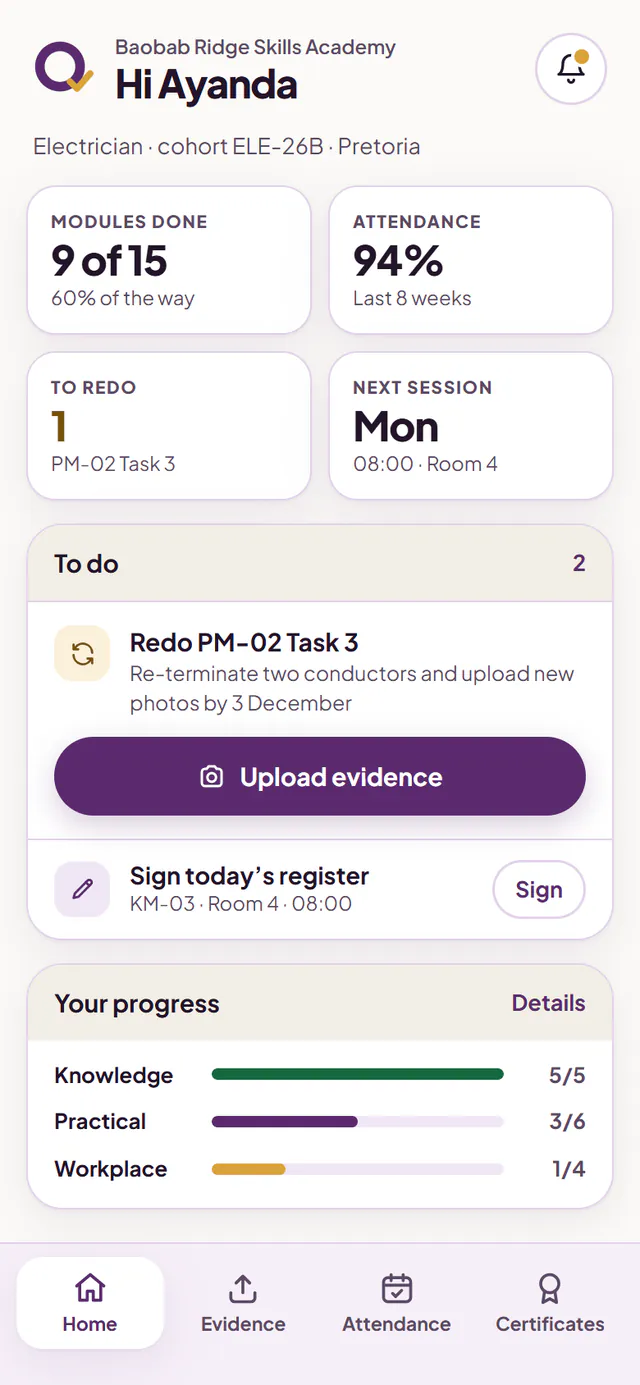
Managers work at a desk, facilitators take attendance on a tablet, assessors mark in the workshop, and learners upload evidence from their phones. One record, every screen.
A role for everyone
Admins, facilitators, assessors, moderators and learners each see what they need. Every change is logged.
Every campus
Run several campuses and delivery sites from one account, or look at one at a time.
Installs like an app
Add QCTO Boss to a phone or tablet home screen and it opens full screen, with its own icon.
Start with the core. Add the rest when you need it.
Priced by the modules you use and the number of active learners. Start with learner records and PoE and add the rest when you need it.
Learner records
Each learner’s details as the QCTO’s enrolment file asks for them, enrolments, cohorts and the full history. Import from Excel.
Programmes and curriculum
Qualifications, part qualifications and skills programmes with their knowledge, practical and workplace modules.
Assessments and PoE
Portfolios of evidence, the assessor’s marks, resubmissions and on-screen signatures.
Attendance and facilitation
Class sessions, facilitators and registers signed on a tablet.
Moderation
Internal moderation samples, findings and sign-off, with staff files kept up to date.
Workplace experience
Placements, logbooks and the employer’s sign-off before EISA.
EISA readiness
Who is ready for the external assessment, their registrations and results.
QCTO submissions
Your learner enrolment and EISA readiness files, prepared and checked before you email them.
Statements and certificates
Statements of results and short-course certificates with a QR code anyone can scan.
Audit and site-visit pack
One click builds the pack for a QCTO monitoring visit or a SETA verification.
CPD and short courses
CPD points, short-course certificates and renewal reminders.
Learner app
Learners see their progress, upload evidence and download their documents.
Insights
Learners by status, marking turnaround, EISA results and certificate checks.
Tell us on the early access form
Tick the modules you’d use and what you’d expect to pay. It shapes what we build first.
Get early accessMade for the people who run training
Accredited providers
Training colleges, private providers and trade test centres’ training arms running occupational qualifications, part qualifications and skills programmes. For providers
Providers moving to QCTO
Running SETA-registered legacy qualifications and the new occupational ones side by side until the legacy ones close. Legacy to QCTO
Corporate academies
Employers training their own people on accredited programmes, with records the business can rely on.
Short-course and CPD providers
Anyone who issues certificates and needs to prove they’re genuine. CPD tracking
The QCTO’s requirements, in plain language
Written from the QCTO’s own documents, with the sources on every page. The tools run in your browser and send nothing anywhere.
Site-visit readiness checklist
Score your provider against what a monitoring visit looks at, and print a to-do list.
Start the checklistLegacy qualification countdown
Each legacy qualification now has its own dates. See how many days are left to enrol and to finish.
Check the datesQCTO accreditation, step by step
How a skills development provider gets accredited, and what the QCTO checks.
Read the guidePortfolio of evidence
What goes in a PoE, who signs what, and how long to keep it.
Read the guideEISA explained
The external integrated summative assessment: what it is and what a learner needs first.
Read the guideQR-verified documents
How a QR code on every statement and certificate lets employers check it in seconds.
See how it worksBuilt for learners’ personal information
Learner records hold ID numbers, details of race, which POPIA treats as special personal information, and details of disability, which deserve the same care. QCTO Boss is being built to protect them.
Two-step sign-in
Every staff user signs in with a password and a code from an authenticator app.
Encrypted
ID numbers, and race and disability details, are encrypted when they’re stored.
Every action logged
Who looked at or changed a record, and when, is kept in an audit log.
Behind Cloudflare
The platform sits behind Cloudflare’s network protection and rate limits.
Help shape QCTO Boss
QCTO Boss is in development. Get early access and tell us what your provider needs first.
Or email hi@qctoboss.co.za